MOSS-Image Base vs SFT: Which Checkpoint Should You Use?
MOSS-Image ships as two checkpoints, Base and SFT. What SFT changes, which one to pick for making images or training LoRAs, and how to run each in ComfyUI or Python.
This is an unofficial guide. MossImage Studio is a community site and is not affiliated with OpenMOSS. The facts below come from the official MOSS-Image repository, the MOSS-Image-Base and MOSS-Image-SFT model cards and the user guide, checked on October 25, 2026.
OpenMOSS released MOSS-Image on October 16, 2026 as two checkpoints: MOSS-Image-Base and MOSS-Image-SFT. They share the same 5B single-stream diffusion transformer, the same inference pipeline and the same Apache-2.0 license. So which one should you download?
The short answer
- To make images, use SFT. It is fine-tuned from Base on curated data. In OpenMOSS's own side-by-side it groups text more clearly and lays the scene out more neatly, and it is the checkpoint the ComfyUI text-to-image templates load.
- To train a LoRA or fine-tune, use Base. It has had no post-training and no distillation of inference settings such as CFG. OpenMOSS kept it that way to preserve the full training signal and make community LoRA training easier.
Our MOSS Image AI generator runs SFT, so anything you make there shows you what the SFT checkpoint does.
Side by side
| MOSS-Image-Base | MOSS-Image-SFT | |
|---|---|---|
| What it is | The base text-to-image model | Supervised fine-tune of Base on curated data |
| Post-training | None, and no CFG distillation | Supervised fine-tuning |
| Best for | LoRA training, fine-tuning, research | Generating images |
| Text and layout | Raw model behavior | Clearer text grouping and a more organized layout in the official example |
| Architecture | 5B single-stream DiT, Qwen3.5 9B text encoder, FLUX.2 VAE | Same |
| Prompt formats | Natural language, tag sequences and JSON layouts, up to 4K tokens | Same |
| Default sampling | 50 steps, CFG 3, shift 5, Euler, negative-branch layer skipping at layer 22 | Same |
| Hugging Face | OpenMOSS-Team/MOSS-Image-Base | OpenMOSS-Team/MOSS-Image-SFT |
| ComfyUI file (int8) | moss_image_base_int8_convrot.safetensors | moss_image_sft_int8_convrot.safetensors |
| License | Apache-2.0 | Apache-2.0 |
Both checkpoints are also on ModelScope under openmoss/MOSS-Image-Base and openmoss/MOSS-Image-SFT.
What the official comparison shows
The README and both model cards show the same whiteboard scene rendered by each checkpoint. OpenMOSS's summary is that SFT "produces clearer text grouping and a more organized whiteboard layout." You can see the pair in the repository's Base vs. SFT section.
That is one example, not a benchmark. For OpenMOSS's systematic evaluation, see the MOSS-Image technical report published on October 19.
Early hands-on impressions point the same way. In a first-impressions thread on r/StableDiffusion, one tester found SFT more stable, and Base more hit-and-miss but sometimes more creative. That is one person's anecdote, but it fits what each checkpoint is for.
When Base is the better choice
- You are training. OpenMOSS released Base for LoRA training and fine-tuning. If you post-train it, their advice is to keep the text encoder frozen.
- You are experimenting with the raw model. OpenMOSS reports that a simple supervised fine-tune of Base was enough to unlock things such as GIF generation and reference-based generation in their tests.
- You want more variety and will tune settings. Base needs suitable inference settings to look its best. The user guide recommends at least 50 steps, CFG 3 (3 to 6, higher for short prompts), shift 5, the Euler sampler, and negative-branch layer skipping at layer 22.
When SFT is the better choice
- Images with a lot of text: posters, menus, signs, packaging, infographics. Clean text grouping is exactly where the official example shows SFT ahead.
- Good results with default settings. SFT is the checkpoint the ComfyUI templates are built around.
- One caveat: some users see vertical color banding with SFT. Community LoRAs such as MOSS-Image-SFT-DeBand, listed in the official README, reduce it. Read the model card for the trade-offs.
How to run each one
ComfyUI
ComfyUI ships templates for both: MOSS-Image: Text to Image and MOSS-Image: Layout-Guided Text to Image load SFT, and the two MOSS-Image Base templates load Base. Both checkpoints run in the same graph, so switching is a single loader change. Our MOSS-Image ComfyUI workflow guide lists the files and where they go.
Python (Diffusers)
The Python code is the same for both checkpoints; only the repository name changes. This is the quick start from the model cards, which ask for Python 3.10 or later, an NVIDIA GPU with CUDA and PyTorch 2.9 or later:
pip install "diffusers>=0.38" "transformers>=5.3" "accelerate>=1.10" "safetensors>=0.6" "Pillow>=10"import torch
from diffusers import DiffusionPipeline
pipe = DiffusionPipeline.from_pretrained(
"OpenMOSS-Team/MOSS-Image-SFT", # or "OpenMOSS-Team/MOSS-Image-Base"
custom_pipeline="pipeline_moss_image",
trust_remote_code=True,
torch_dtype={"default": torch.bfloat16, "vae": torch.float32},
)
pipe.scheduler = type(pipe.scheduler).from_config(pipe.scheduler.config)
pipe.to("cuda")
image = pipe(
'A small bakery storefront with a hand-painted window sign reading "Fresh Bread Daily"',
height=1024,
width=1024,
num_inference_steps=50,
guidance_scale=3.0,
uncond_skip_layers=[22],
generator=torch.Generator("cpu").manual_seed(42),
).images[0]
image.save("output.png")uncond_skip_layers=[22] is the default negative-branch layer skipping; pass [] to turn it off, or set negative_prompt to use a negative prompt instead. Image dimensions must be positive multiples of 16.
In your browser
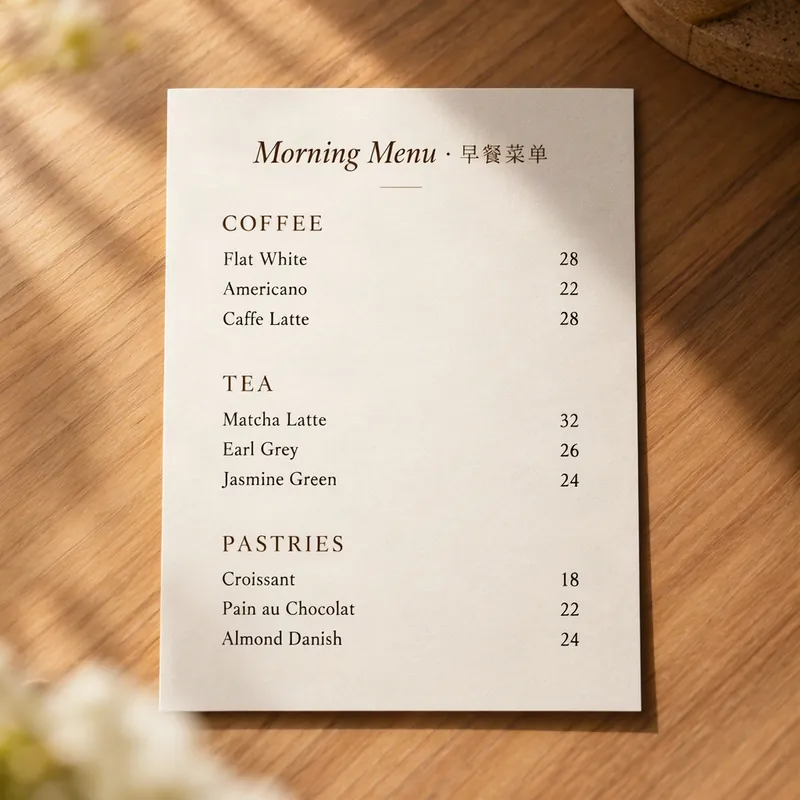
Our free MOSS-Image generator runs SFT with the official 50 steps and CFG 3, so you can compare it with a local Base run. Load this prompt and see how SFT groups the text:
Prompt
A clean, elegant cafe menu card on a wooden table, titled "Morning Menu · 早餐菜单". Three sections: Coffee, Tea and Pastries, with items and prices such as "Flat White 28", "Matcha Latte 32" and "Croissant 18". Cream paper, minimalist serif typography, soft natural light.
Try this promptWhat about Turbo, Edit and other variants?
As of October 25, 2026, Base and SFT are the only official checkpoints.
- Turbo or few-step models. OpenMOSS says it is still working on few-step distillation such as DMD. The fast versions around now are community work, for example lodestones' MOSS-Image-SFT-8-steps-dmd, an 8-step distillation of SFT that the official README lists.
- Editing. There is no separate edit model. OpenMOSS says layouts can support controlled editing: change the text, an element's description or its bounding box, and the image changes in a structured way. Our JSON layout tutorial explains the format. A core developer on r/StableDiffusion also says the team has made controlled edits by changing the prompt while keeping the seed fixed.
- Quantized and patched weights. The community has published GGUF and INT8 builds, and FP16-compatible weights for both checkpoints (MOSS-Image-FP16-fixed by KBlueLeaf). Check which checkpoint a file was made from before you use it.
Sources
- OpenMOSS/MOSS-Image on GitHub
- MOSS-Image-Base and MOSS-Image-SFT model cards
- MOSS-Image user guide
- MOSS-Image technical report, arXiv 2610.23374
- MOSS-Image in ComfyUI, ComfyUI documentation
More Posts
MOSS-Image Prompt Guide: Chinese and English Text in Images
Write MOSS-Image prompts that render clean Chinese and English text: describe the finished image, quote the exact words and control line breaks. With examples to try.

MOSS-Image JSON Layout Tutorial: bbox, yxyx and Coordinates
Write MOSS-Image layout prompts by hand: the summary and items fields, yxyx bounding boxes in centered pixel coordinates, a converter, and examples to copy.

MOSS-Image ComfyUI Workflow: Models, Templates and Settings
Run MOSS-Image in ComfyUI: the four official templates, which model files to download and where they go, and the steps, CFG and SLG settings that matter.